


Lumyros: Aurora App & Social
1.74.00 Reviews
App Specs
- Version
- 3.3.2
- Updated On
- License
- Free
- Downloads
- 10,000+
- Developer
- Jan Svamberg
- Categories
- Weather
- Platform
- Android
Screenshots
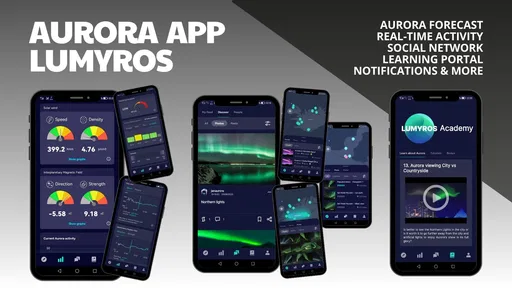
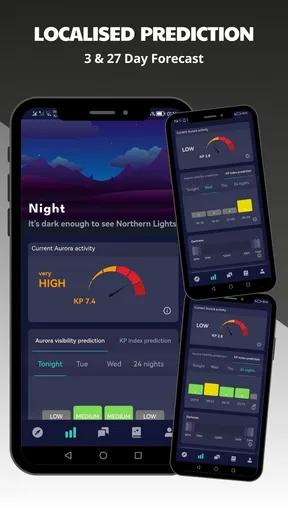
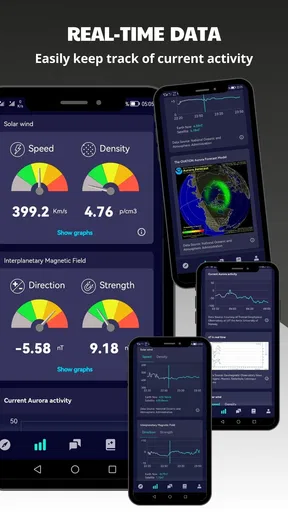
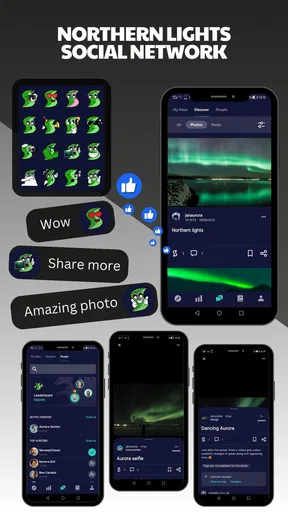
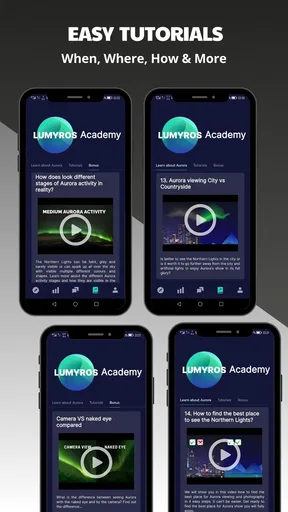
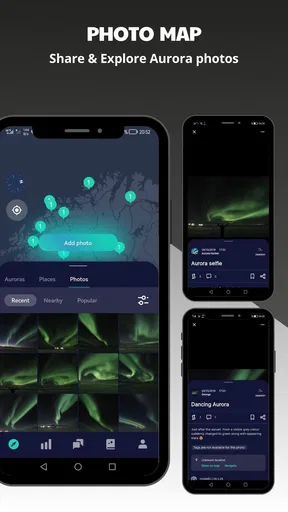
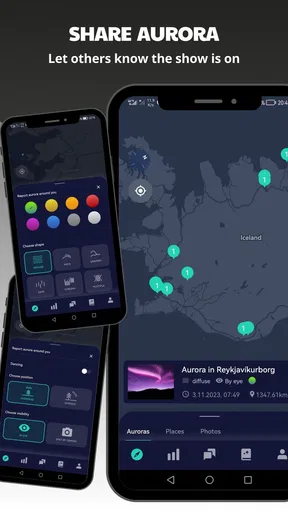
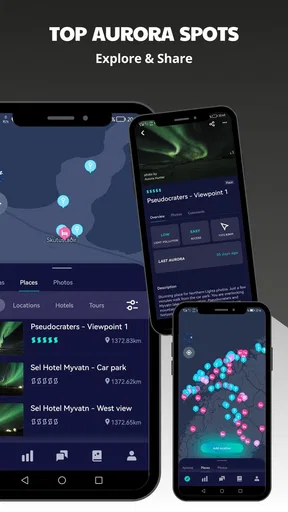
 Analysis by AppCompare
Watching the Northern Lights is partly a weather problem and partly a timing problem. I can accept a cloudy evening, but I do not want to drive somewhere dark only to discover that the useful information arrived too late or that I misunderstood the conditions. Lumyros: Aurora App & Social approaches that problem as a weather app focused on aurora hunters, with a social angle that makes the experience feel less like reading a forecast in isolation.
After spending time with it, I see a clear purpose: this is for people who want to follow aurora opportunities and feel connected to others who are looking at the same sky. It is not a replacement for a complete everyday weather service, and I would not treat its low average rating of 1.7 as something to ignore. At the same time, the rating comes from a small group of users, with 26 ratings and 4 written reviews, so I would read it as a warning to test the app carefully rather than as a complete verdict on every phone.
What Lumyros is trying to do differently
Lumyros is a free weather app from Jan Svamberg, released on March 1, 2023. Its age rating is Everyone, and it is available for devices running Android 6.0 or later. The current version is 3.3.2, while the app has passed 10K installs. Those details place it in a fairly accessible part of the Android ecosystem, although the modest audience also means I would not assume the same level of polish or community activity found in the biggest weather platforms.
The central idea is more specific than simply showing rain or temperature. The app is aimed at people who plan evenings around the possibility of seeing auroras. That changes how I judge it. I care less about whether it can replace my normal morning forecast and more about whether it helps me decide when to keep watching, when to prepare, and when to stop wasting a cold evening outside.
The social element is important to the identity of the app. Aurora watching can be solitary, especially when you are standing in a quiet field or looking through a window at a sky that may or may not change. A connected community can make the waiting more useful, because other observers may be checking conditions at the same time. The trade-off is that a social weather experience depends on activity and connectivity. If few people are participating in the moment, the communal side naturally feels thinner.
The strongest reason to try Lumyros is not ordinary weather coverage; it is the combination of aurora-focused attention and a shared viewing experience. If you only want a quick answer to whether it will rain during a commute, a conventional weather app is likely to be quicker and more complete. If you regularly plan trips around dark skies, this narrower focus makes more sense.
Why the network matters during an aurora watch
The app’s concept works best when the phone can reach current information and when other users are active. That matters more here than it would in a simple static reference app. An aurora hunt is often decided by a changing situation: cloud cover can move, visibility can improve, and a promising night can become disappointing. I would open Lumyros shortly before leaving, check again on the way, and use it as one part of a decision rather than as a single unquestionable signal.
Worth Reading Before You Choose

EA SPORTS FC Mobile 26 Is a Bigger Football Game, but It Takes Time

Flipboard Shows What News Apps Must Do Beyond the Feed

Switching to Android Auto Means Rethinking Your Driving Routine

Google Calendar Makes a Crowded Week Easier to Manage

Ludo King Makes the Most of the Minutes Between Plans

Baby Panda World Brings Quick Play to Modern Phones, but Its Game Library Feels Busy
This is also where expectations need to be realistic. A forecast cannot make the sky clear, and a social report cannot guarantee that a glow will be visible from your exact location. The app can help organize attention around the opportunity, but it cannot remove the uncertainty that makes aurora watching exciting in the first place. I found that mindset useful because it prevents the common mistake of treating a favorable indication as a promise.
For a group of friends, the connected angle could be more valuable than it first appears. One person might be checking from a town, another from a darker rural area, and another from a nearby coastal location. Comparing what each person sees can help separate a local cloud problem from a broader lack of activity. I would still keep descriptions cautious, because different phone cameras, horizons, and light pollution can make the same sky look very different.
A practical habit is to check the app before you start driving, not while you are already on the road. Save the decision for a safe stop, and treat the phone as a planning tool rather than something to watch continuously. This is a small change, but it makes the app more useful and avoids turning an atmospheric hobby into distracted driving.
Using it from a phone in real situations
Mobile use is where an aurora app either earns its place or becomes another icon I forget. I imagine using Lumyros in three main contexts: at home while deciding whether to go out, during a short stop near a viewing location, and outside while waiting for the sky to change. Each situation puts different pressure on the experience.
At home, I have the most patience. I can review the information, think about cloud cover and visibility, charge the phone, and decide whether the trip is worth it. This is the best time to explore the social side as well, because I am not standing in the cold with limited battery and poor reception. I would use this stage to form a plan, not to make a last-second promise to myself that the lights must appear.
During a mobile stop, speed matters more. I want to glance at the relevant information, understand whether the situation has changed, and put the phone away. A focused app can be helpful here because I am not navigating through unrelated sports, news, advertising, or long-term weather screens. However, if the connection is weak or the interface takes too long to refresh, the narrow focus becomes less of an advantage.
Outside, the screen is not the main event. Brightness can interfere with night vision, and repeatedly checking the phone can make me miss a brief change overhead. My preferred routine would be to dim the display, check only at sensible intervals, and spend more time looking up than scrolling. The social function should support the observation rather than replace it.
One non-obvious trade-off is that a phone optimized for connected checking may be less useful exactly when I become most eager to use it: away from towns, under dark skies, and in places where mobile coverage can be inconsistent. I would therefore treat network access as part of the outing checklist. Before leaving, I would open the app, confirm that it is behaving normally, charge the phone, and avoid assuming that a remote viewpoint will offer the same connection as home.
The app is also better suited to deliberate observers than to people who want a passive alert system to handle everything. I would not build an evening around the assumption that the phone will always tell me the perfect moment. Instead, I would use it to narrow the time window, then rely on my own judgment about darkness, clouds, local lights, and safety.
What happens when the connection or forecast disappoints
Every connected weather experience needs a recovery routine, and this one is especially important because aurora trips can involve travel. If the app does not load, refresh, or show useful information at the moment I need it, I would first stop and check the basics: is the phone connected, is the battery sufficient, and did the app open correctly? I would avoid repeatedly tapping refresh while standing in an exposed location, since that rarely improves a weak signal and quickly drains patience.
My fallback would be simple. I would use information I checked before leaving, look at the actual sky, and decide whether the conditions still justify waiting. If I had travelled with friends, I would compare observations rather than letting one missing screen end the evening. This is not a claim that the app works without a network; it is a sensible way to avoid making one mobile failure responsible for the whole outing.
There is another kind of failure: the app may be available, yet the night still produces nothing visible. That is not necessarily an application error. Aurora visibility depends on more than a promising forecast, and the human eye may see less than a camera or another observer. I appreciate apps more when they help me manage uncertainty honestly. Lumyros is most useful when I treat it as guidance for choosing when and where to look, not as a guarantee of a spectacle.
The low rating is a genuine reason for caution. I would install it first on the phone I normally use, test it at home, and avoid making an expensive or distant trip based on a first impression. A small test also answers practical questions that matter more than a store description: does it load comfortably on your connection, is the information easy to interpret at a glance, and does the social element feel active enough for your area?
Because the app includes optional in-app purchases ranging from $0.99 to $99.99 per item, I would also review any purchase screen carefully before confirming anything. The free entry point makes testing straightforward, but “free” does not mean every part of the experience is necessarily included at no cost. I would begin with the basic experience, understand what I am receiving, and only then decide whether an optional purchase adds real value to my routine.
Keeping mobile data and battery use under control
Aurora watching often takes me away from strong Wi-Fi, so data-conscious habits are important. I would avoid leaving the app open continuously while waiting for the sky. Instead, I would check in planned intervals, close it when I am observing, and use a low screen brightness that still lets me read the display. This approach is useful for any connected forecast app, but it matters more when the phone is also serving as a camera, flashlight, map, and emergency contact.
I would also avoid turning a social feed into a constant refresh loop. The community side is valuable when it adds context, but repeatedly checking for a new post can consume attention without improving the decision to stay outside. A better workflow is to check before departure, once after arriving, and again only when the sky or local conditions give me a reason to reassess.
Another useful distinction is between planning data and live reassurance. At home, I can afford to explore and compare. In the field, I need short checks. Separating those jobs reduces both data use and mental clutter. It also makes the app easier to judge: if it helps me prepare before leaving and confirm a sensible plan after arrival, it is doing its job even if I do not keep it visible every minute.
I would not recommend relying on it as the only safety tool for a remote outing. Weather awareness is not the same as route planning, emergency preparation, or knowledge of the location. Bring the essentials for the place and season, tell someone where you are going, and keep enough battery for communication. Lumyros can support the decision to look for auroras, but it should not become the entire plan.
Who will enjoy it, and who should choose another weather app?
I think Lumyros is a reasonable experiment for a beginner who has recently become interested in the Northern Lights and wants a more focused starting point than a broad weather dashboard. It may also suit an enthusiast who enjoys discussing observations with other hunters and does not mind checking a connected service during a viewing session.
I would be more hesitant to recommend it to someone who needs a dependable all-purpose weather tool for work, travel, farming, hiking, or severe-weather decisions. A mainstream weather app is usually the better primary choice for broad forecasts, radar-style planning, and everyday reliability. Lumyros makes more sense as a specialist companion, not as the only weather app on the phone.
It may also disappoint users who expect a completely passive experience. The app’s value depends on the user interpreting conditions, choosing a sensible time to check, and accepting that the sky can ignore a favorable forecast. People who want a guaranteed alert, a fully automated itinerary, or a replacement for local knowledge should look elsewhere or use Lumyros alongside another service.
The developer, Jan Svamberg, has kept the concept clear enough to understand quickly: this is a weather-focused tool built around aurora interest and connection with other observers. The challenge is that a focused concept raises the standard for execution. When an app covers one special use case, I notice delays, confusing information, quiet community activity, or payment friction more quickly than I would in a general-purpose tool with many unrelated functions.
My verdict on staying connected without losing the sky
I like the direction because aurora watching benefits from shared observations, and a specialist app can be more motivating than a generic forecast screen. Lumyros gives that hobby a dedicated place on the phone, and its free starting point makes it easy to see whether the experience fits your habits. Its Everyone rating also makes it approachable for households and younger sky-watchers, provided an adult handles any purchase decisions when appropriate.
My recommendation is measured rather than enthusiastic. Install it at home, test the basic experience on your usual network, and see whether the community and forecast workflow are useful in the places where you actually watch the sky. Then try it during a nearby outing before depending on it for a long journey. Keep another general weather source available, especially when safety or travel is involved.
Lumyros is worth considering as a connected aurora companion, but not as a promise that the lights will appear or that your phone will always have the last word. Its best use is a calm routine: check before leaving, confirm after arrival, conserve the battery, compare observations sensibly, and then put the screen away. If you want that balance between specialist forecasting and shared interest, it has a clear reason to exist. If you want a complete, proven daily weather replacement, I would choose a broader alternative and treat this app as optional.
Pros
- Beautiful aurora-themed interface with a distinctive visual identity.
- Social features make it easy to discover and share creative content.
- Useful for finding inspiration and connecting with like-minded users.
- The app encourages regular engagement through fresh community activity.
- Suitable for users who enjoy expressive
- visually focused social platforms.
Cons
- The niche community may feel small compared with larger social networks.
- Some features may require an account or personal profile information.
- Content quality can vary depending on community participation.
- Frequent social updates may become distracting for some users.
- Performance and loading speed may depend heavily on your device and connection.
FAQs for Lumyros: Aurora App & Social
What is Lumyros: Aurora App & Social, and what can I do with it?
Lumyros: Aurora App & Social appears to combine an aurora-themed visual experience with social features. Depending on the available version, users may be able to explore atmospheric content, personalize their experience, interact with other members, and share posts or reactions. Before downloading, check the current store description because features, supported content, and community tools may change through updates.
Is Lumyros: Aurora App & Social free to download and use?
The app may be available as a free download, but some functions could require in-app purchases, subscriptions, or other paid upgrades. These may include premium visual content, customization options, additional social tools, or an ad-free experience. I recommend reviewing the App Store or Google Play listing carefully and checking the payment terms before starting a trial or entering billing information.
Does Lumyros: Aurora App & Social require an account or internet connection?
Because Lumyros includes social functionality, an account may be required for features such as creating a profile, posting content, following users, or participating in community interactions. An internet connection is also likely needed for synchronization and online content. Some visual or personalization features may work offline, but the exact offline capabilities can vary between Android and iOS versions.
Is Lumyros: Aurora App & Social safe for children and private to use?
Parents should review the app’s age rating, privacy policy, and community guidelines before allowing children to use it. Social applications can involve user-generated content, messaging, profiles, and data collection, so privacy settings and moderation tools are important. Avoid sharing sensitive personal information, use a strong password, and check whether parental controls or reporting options are available.
What should I check before installing Lumyros: Aurora App & Social?
Before installation, verify that your phone meets the app’s operating-system and storage requirements, and confirm that you are downloading the official version from Google Play or the Apple App Store. Also review recent user feedback, permissions, subscription pricing, and the developer’s privacy information. If the app relies heavily on visuals or social content, a stable connection and sufficient free storage may improve performance.


